

e‑Invoice Gateway Enterprise SaaS
Enterprise‑grade e‑Invoice integration designed primarily for SAP (ECC / S/4HANA), with full control over infrastructure, security, and integrations.
The Enterprise solution allows the entire e‑Invoice process to run fully within your systems, under your IT policies, access rules, firewall restrictions, and governance procedures.
This is the most robust model for organizations using SAP, as well as companies with strict security, compliance, and audit requirements.
In Brief
Gateway Enterprise SaaS is an integration solution that enables the preparation, submission, retrieval, and monitoring of electronic documents through the UJP e‑Invoice platform, without changes to your existing ERP architecture. It supports both sales and purchase documents, statuses, EUID information, logs, activity history, notes, and attachments within a single operational process.
It is particularly suited for organizations where SAP (ECC or S/4HANA) is the primary system and where control, security, and compliance are critical.
How it works
-
Your ERP (for example SAP ECC/S4HANA) exports invoices in XML/UBL or a standardized Excel Template
-
The Gateway validates, transforms, and submits them to UJP
-
UJP returns the EUID, status, and timestamp
-
The Gateway stores all information with a complete audit trail
All processes run in your internal infrastructure or in your BC Runtime, according to your access, security, certificate, SSO, and firewall policies.
Mini architecure
SAP ERP → Gateway Enterprise → UJP e‑Invoice Platform
(including Business Central Runtime + LSM Reusables + LSM API Connector + LSM e‑Invoice Engine)
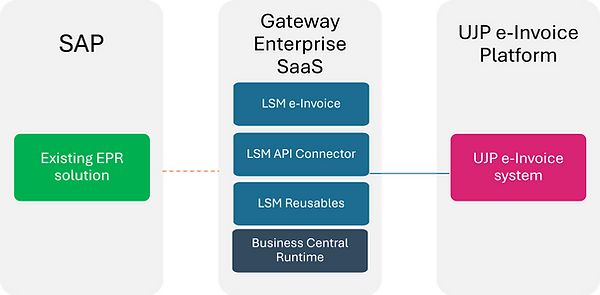
The Gateway operates on Business Central as a runtime engine, but it is not an ERP and it does not modify your SAP processes or SAP documents.
Important: SAP Remains Your Central ERP System
Gateway Enterprise is not a SAP Add-On and does not make changes to SAP documents, SAP transactions, or SAP business processes.
SAP remains the system where documents are created and processed, while Gateway Enterprise provides communication with the UJP e-Invoice platform, status management, EUID information, and complete process traceability.
This approach enables the introduction of e-Invoice with minimal impact on the existing SAP environment, without requiring changes to established business procedures and responsibilities.
Working with Incoming Documents (Purchase Invoices)
Gateway Enterprise enables the processing of incoming electronic invoices through the UJP e‑Invoice platform. Depending on the certificate model and operational configuration, documents can be retrieved, processed, and monitored within a single operational workspace.
Key Capabilities
-
Review of incoming (purchase) invoices
-
Tracking of statuses and EUID information
-
PDF representation of documents
-
Acceptance of purchase invoices
-
Rejection of purchase invoices with a reason
-
Status updates in the UJP e‑Invoice platform
-
Complete activity history and audit trail
-
Notes and comments related to the invoice
-
Uploading additional documents and attachments
Security, Certificates and Identity Management
Security and Access Control
Gateway Enterprise is designed for organizations with strict requirements for security, traceability, and access control.
Access to documents, submissions, and statuses can be restricted based on user roles and organizational policies. All activities are recorded with a complete history of changes and an audit trail for internal controls, compliance requirements, and auditing purposes.
Certificate Management
Gateway Enterprise supports multiple digital certificate models:
-
Software certificates
-
Hardware token certificates
-
Separate certificates for test and production environments
-
Separate certificates per legal entity
-
Certificate renewal and replacement procedures
The configuration can be aligned with the organization's existing security policies and operational procedures.
Secure Communication
Communication with the UJP e-Invoice platform is performed through secure HTTPS connections.
The platform provides:
-
Authentication using digital certificates
-
Encrypted communication
-
Monitoring of successful and failed submissions
-
Complete records of all submitted documents
This ensures secure and controlled data exchange between the organization and UJP.
Identity Management
Depending on the selected architecture and infrastructure, Gateway Enterprise can support:
-
Microsoft Entra ID
-
Single Sign-On (SSO)
-
Multi-Factor Authentication (MFA)
-
Standard Business Central authentication
This allows the e-Invoice process to be integrated into the organization's existing identity and access management framework.
Audit Trail and Traceability
Every activity is recorded with:
-
User
-
Date and time
-
Document reference
-
EUID
-
Status
-
Submission result
-
Notes and comments
This provides complete traceability of all activities related to the e-Invoice process.
What exactly are you buying with the Gateway SaaS?
The Gateway SaaS is a complete Enterprise solution composed of three clear elements: the software stack, the implementation services, and the licensing with SLA support.
Together, these three components create a secure, stable, and fully compliant process for automated e‑Invoice submission to the UJP - without any changes to SAP.
Architecture & Product Stack
Gateway Enterprise uses the same LSM e‑Invoice product stack that powers all solutions in the portfolio: LSM e‑Invoice Macedonian API App, LSM API Connector, and LSM Reusables, running on top of Business Central Online (SaaS) as the runtime environment. All communication with UJP is executed on this foundation.
Business Central Runtime (Foundation)
Business Central is the execution foundation of the Gateway. All LSM extensions run inside this environment, using its tables, number series, security model, and tenant isolation under your own IT governance. It may operate On‑Prem or as BC Online, and it is the essential runtime layer on which the entire solution depends.
LSM Reusables App (Localization Data Layer) ...
... delivers the localization core, supplying Macedonian fiscal rules, validations, and data structures that ensure documents are consistent and ready for transformation into the UJP format before submission.
LSM API Connector App (Transport Layer) ...
... provides secure communication with UJP through HTTPS, certificates, and JSON exchange. It manages transport, errors, and retries, ensuring stable and traceable connectivity with the e‑Faktura system.
LSM e‑Invoice Macedonian API App (Gateway Engine) ...
... transforms documents into a UJP‑compliant structure, submits them via API, and records all UJP responses - EUID, status, and QR link - with a full audit trail. This layer drives submission logic, corrections, and future UJP enhancements.
UJP e‑Faktura Platform (Government Clearance)
At the top sits UJP’s centralized platform, which receives, validates, and clears e‑invoices. After submission, it returns the EUID, status, and timestamp, confirming official acceptance.
The model provides stability, security, and future‑readiness, requiring only minimal adjustments when UJP expands its API capabilities (status/inbound).

This diagram illustrates the full architecture of the Enterprise solution, built on Business Central as the execution platform.
Above BC are the three LSM applications, Reusables, API Connector, and e‑Invoice, which together form the Gateway layer for secure preparation, transformation, and submission of e‑invoices to UJP.
At the top is the UJP e‑Faktura platform, the government system responsible for validating and accepting submitted invoices.
Implementation Services
The Enterprise package includes a structured and comprehensive set of services designed to ensure a secure, controlled, and predictable implementation within your infrastructure. These services are tailored for Enterprise environments, SAP‑centric processes, and organizations with strict IT policies.
1) Installation in your infrastructure
Deployment of the LSM e‑Invoice App, LSM API Connector, and LSM Reusables, configuration of UJP test/prod, and alignment with your certificates and network policies.
2) Excel Templates (default – always included)
This is the standard input method in the Self‑Hosted package: structured templates (Invoice + Credit Memo), built‑in validations, fastest time‑to‑production, and lowest IT effort.
3) UJP Submission & Response
Automatic submission to UJP (JSON), reception and storage of EUID, status/message, timestamp, and QR link, with full audit trail and logs.
4) Training & Launch Support
Role‑based training (Operations + Admin) and a 60‑day launch support add‑on, combined with your selected SLA tier.
What’s not included
-
Development in SAP/Oracle/F&O and middleware (PI/PO, SOA, MuleSoft) beyond defined integrations
-
Business Central custom development unrelated to e‑Invoicing
-
ERP reorganization
-
Power BI and advanced reporting (available as add‑ons)
Supported SAP Environments
Gateway Enterprise is designed for organizations that use SAP as their primary ERP system and require a compliant e-Invoice process without significant changes to their existing SAP architecture.
The solution can be used with:
-
SAP ECC
-
SAP ECC EHP environments
-
SAP S/4HANA
-
SAP S/4HANA Private Cloud
-
SAP S/4HANA On-Premises
-
Hybrid SAP landscapes
Depending on the organization's architecture, integration can be implemented through:
-
Excel templates
-
File exchange
-
API integrations
-
Middleware platforms
-
SAP Integration Suite
-
SAP PI/PO solutions
SAP remains the central ERP system, while Gateway Enterprise provides communication with the UJP e-Invoice platform and manages statuses, EUID information, and audit trail records.
Licensing & SLA Support
Licensing in the Enterprise model is structured, predictable, and fully aligned with the architecture of the solution. It consists of three main elements - Microsoft licenses for the execution layer, LSM licenses for the Gateway components, and a company‑based e‑Invoice license. SLA packages ensure operational continuity, stability, and long‑term compliance.
Business Central Runtime Licenses
Business Central is used exclusively as a runtime engine for the LSM components - not as an ERP system.
The following licenses are required:
-
Full Users – responsible for submitting, signing, correcting, and managing document statuses
-
Team Members – responsible for data preparation, validations, and operational support
These licenses provide the secure execution environment needed for Gateway processes without affecting or modifying SAP workflows.
LSM app licenses (per Full User)
LSM components are licensed only for Full Users, ensuring cost‑efficient scaling even in organizations with larger operational teams. Team Members do not increase the number of required LSM licenses.
This category covers the licensing of all underlying LSM modules that make up the Gateway execution logic and ensure proper handling of fiscal rules, communication, and validation requirements.
Company‑based LSM e‑Invoice license
The e‑Invoice license activates the complete e‑Invoice functionality within the Gateway:
-
One license per legal entity
-
Includes up to 5,000 documents per month (outgoing + incoming)
-
Covers transformation, validation, submission, EUID, statuses, QR codes, timestamps, archiving, and full audit‑trail
-
Higher volumes are available through tiered subscription levels
This model is ideal for SAP and enterprise‑scale companies with high document throughput.
SLA Support (Core / Plus / Prime)
SLA packages provide stability, predictability, and operational assurance for your production environment. Each package includes a defined number of hours, incidents, response times, and additional services.
SLA Core — essential operational stability
-
Response time: 2 business days
-
5 included hours and 5 incidents per month
-
Basic system monitoring
SLA Plus — enhanced operational assurance
-
Response time: 1 business day
-
10 included hours and 10 incidents per month
-
Support for SaaS, Login Systems On‑Prem, and Client‑Hosted environments
-
Optional test environment maintenance
SLA Prime — enterprise‑grade priority
-
15 included hours and 15 incidents per month
-
Priority support, phone access, and dedicated support portal
-
Monthly Job Queue health check (on request)
-
Test database maintenance included
-
Optimized for SAP organizations with strict CAB and compliance processes
Daily operation with the e‑Faktura Gateway
1) Data input
-
By default: the user uploads Excel files (Invoices / Credit Memos) into the Gateway.
-
With integrations (outside standard scope): depending on the agreed level, the Gateway automatically retrieves data from the ERP (API / SQL / Dataverse).
2) Validation & preparation
Validation of mandatory fields, alignment with UJP structures, and e‑invoice VAT logic. If needed, reference documents could be attached.
3) Submission to UJP (JSON)
Secure API connection to test/prod.
4) Storing UJP results
EUID, status/message, timestamp, QR link - stored on the document.
5) Logs & corrections
Full audit trail with options for resubmission/corrections.

Typical process: Working with Incoming Documents
1) Retrieving Incoming Documents
Depending on the certificate model and operational configuration, the Gateway enables the retrieval and processing of incoming documents from the UJP e-Invoice platform.
2) Review and Analysis
Users can review purchase invoices, PDF representations, statuses, and EUID information within a single operational workspace.
3) Notes and Attachments
Notes, comments, and additional attachments can be added to each invoice as part of internal review, approval, and documentation processes.
4) Acceptance or Rejection
Users can accept a purchase invoice or reject it with a reason. The Gateway records the decision and updates the corresponding information in the UJP e-Invoice platform.
5) History and Traceability
All activities, status changes, notes, attachments, and communication are recorded with a complete activity history and audit trail.
A Company Using SAP with a Need for e‑Invoice Integration
The Need and Context
The company uses SAP as its primary ERP system and processes around 300 sales invoices and 500 purchase invoices per month. Due to high IT standards, a controlled security environment, and its own on‑premises infrastructure, the company requires an e‑Invoice solution that operates internally, without any modifications to SAP and without dependencies on external systems.
The Current System
SAP remains the central ERP where all documents are generated. The company assigns two users to handle the e‑Invoice process: one Full User responsible for submitting, signing, and managing documents, and one Team Member responsible for preparing data and maintaining operational accuracy.
The Solution
The Gateway SaaS enables the entire e‑Invoice submission process to run within the company’s own infrastructure.
Implementation. The implementation includes all required activities: setting up Business Central as a runtime environment, installing and configuring the LSM components, establishing UJP test and production connectivity, configuring certificates and communication parameters, preparing Excel templates with mandatory validations, and completing a full UAT cycle.
A key advantage is that all functionality is activated without any changes to SAP.
Licenses. In addition to implementation, the company acquires the necessary Business Central licenses for the Full User and Team Member, along with the LSM apps that power the Gateway. The regulated submission process is activated through a company‑based e‑Invoice license that supports up to 5,000 documents per month.
Support. For operational stability, the company chooses the SLA Core package, with the option to upgrade to SLA Plus if they require more intensive involvement or faster response times during the first year.
The Investment
The investment consists of two parts.
The one‑time cost covers the full implementation: system setup, configuration, testing, and production activation.
The monthly cost covers the Business Central licenses for the Full User and Team Member, the LSM app licenses for the Full User, the company‑based e‑Invoice license, and the selected SLA support package.
The Result
With the Gateway Enterprise SaaS, the company achieves a stable, secure, and fully automated e‑Invoice flow to UJP. SAP exports the documents, the Gateway processes and submits them, UJP returns the statuses, and the system stores all history including EUID, QR, and audit‑trail.
The entire process becomes predictable, compliant, and fully controlled - with no changes to SAP and no SAP add‑ons required.
Frequently Asked Questions (FAQ)
Does Gateway Enterprise support SAP ECC?
Yes. Gateway Enterprise can integrate with SAP ECC environments and provide an automated process for electronic invoice exchange with the UJP platform.
Does Gateway Enterprise support SAP S/4HANA?
Yes. The solution is suitable for SAP S/4HANA environments and can be adapted to different integration scenarios.
Does SAP remain the primary ERP system?
Yes. SAP remains the primary ERP system where business documents are created and processed. Gateway Enterprise is designed to manage the e-Invoice process and communication with UJP.
Are SAP modifications required?
In most cases, no. The solution is designed so that the e-Invoice process can be introduced without significant changes to existing SAP business processes.
Can sales invoices be submitted automatically?
Yes. Data can be automatically collected, validated, transformed, and submitted to the UJP e-Invoice platform.
Are incoming purchase invoices supported?
Yes. Gateway Enterprise supports downloading, monitoring, reviewing, accepting, and rejecting incoming electronic invoices.
What types of certificates are supported?
The solution supports software certificates, token certificates, and enterprise certificate management models according to the organization's requirements.
Do we need to obtain a new digital certificate?
Not always. Depending on the existing infrastructure and the certificates already available within the organization, it is often possible to use existing certificates. During the Readiness Program or the initial assessment, the most appropriate certificate model is identified and recommended.
Does the solution support Single Sign-On (SSO)?
Yes. Depending on the configuration and infrastructure, integration with Microsoft Entra ID and Single Sign-On mechanisms can be implemented.
Does the solution support Multi-Factor Authentication (MFA)?
Yes. MFA can be implemented through Microsoft Entra ID and other enterprise security mechanisms.
Can the solution be used for multiple companies?
Yes. A single Gateway environment can support multiple legal entities with separate configurations, certificates, and access controls.
Is a complete audit trail available?
Yes. The system records all activities, statuses, EUID information, users, dates, and changes related to the e-Invoice process.
Why choose Gateway Enterprise instead of a SAP Add-On?
Gateway Enterprise is designed for organizations that want a centralized e-Invoice platform that can be used not only with SAP, but also with other ERP systems, while providing advanced traceability, security, and future extensibility capabilities.
What’s next? Choose the most suitable next step for your organization.
Gateway Enterprise is designed for companies that use SAP and operate their own infrastructure, maintain strict IT policies, and require full control over the e‑Invoice process.
Share a few basic details with us and we will prepare an initial assessment for implementation, licensing, and SLA support – tailored to your system and document volume.
Select your next step:
You will receive an initial and targeted assessment based on your information, with clearly outlined one‑time and monthly costs for the Gateway Enterprise.
A short 15 minute session with an expert to review your SAP environment, UJP requirements, technical prerequisites, and the most suitable model for your organization.